Local AI Coding Assistant in Neovim in 2026 v3
Entering Pi
Posted on June 2, 2026
In my previous post, I covered my improved setup for a local AI coding assistant in Neovim. Just for a brief recap: I was running Qwen3.5-35B-A3B on llama.cpp for chat and code editing, with Qwen2.5-Coder-7B handling auto-completion via llama.vim. Chat went through Claude Code in the terminal, which was already a big improvement over my old CodeCompanion setup.
But there was still something missing. I tried using Opencode for a bit — it has a solid plugin system, subagents, git integration, the works. The thing is, I wanted to optimise for local model workflows: token-efficient file reading, git worktrees for parallel builders, guardrails for models that get stuck in loops.
That’s when I switched to Pi — an agentic framework designed from the ground up to be extensible. Everything is a plugin. Every tool can be modified without touching the core. And the result is something that actually adapts to how I work, not the other way around. I’ve open-sourced all my extensions — custom read and search tools, subagent protocols, and more — over in my dotfiles repo. I’ve also open-sourced the pi-agent.nvim Neovim plugin that I use to integrate with Pi (introduced below).
This post is part of a series on local AI coding assistants:
- Local AI Coding Assistant in Neovim in 2026
- Local AI Coding Assistant in Neovim in 2026 v2
- Local AI Coding Assistant in Neovim in 2026 v3
# The setup
I’m running Qwen3.6-35B-A3B via local llama.cpp with a 262k token context. For code autocompletion, I use Qwen2.5-Coder-3B (the int8 version) through llama.vim. I previously used the 7B model, but didn’t see any significant difference with the 3B.
No internet required, no data leaves my machine, and prefix caching means subsequent generations in the same session are fast even with large codebases. My MacBook Pro M4 handles it fine — inference sits around 35 tokens/s for generation, with prompt processing at ~350 tokens/s. Generation speed is fine, but prompt processing is significantly slower than running on dedicated NVIDIA GPUs — that’s the bottleneck to optimise for. Token-efficient tooling (the outlined read extension, compact search results, minimal context) matters because every extra token in the prompt costs more time here.
The extensions live in my dotfiles repo as TypeScript plugins. If you want to set up something similar with Pi yourself, the main ingredients are a local inference backend, the Pi framework, and whatever extensions you need for your workflow.
# Why Pi
I dug around for a bit, trying different frameworks. The key thing that Pi does better than the others is simply customisation. Pi treats everything as an extension. Want to add a new tool? Drop a plugin in extensions/. Want to change how reading works? Edit the read extension without touching the orchestrator. Want to ensure that all your sessions run in git worktrees? Create an extension that hooks into the startup code of Pi itself.
The difference for me was practical. I wanted builders with git worktrees that merge automatically. I wanted a read extension backed by a tree-sitter index for token efficiency. I wanted guardrails for models that loop. With Pi, I could build these as isolated extensions without fighting the core architecture. Pi’s model-to-extension mapping fit my use case well.
# A typical workflow: adding a feature end-to-end
Here’s what a typical Pi session looks like. Say I want to add rate limiting to my API backend:
Add rate limiting to the FastAPI backend — 100 requests per minute per user, with Redis backing.
The planner read the codebase and came back with five tasks: (1) add Redis connection utility, (2) create the rate limiter middleware, (3) wire it into the FastAPI app, (4) add tests, (5) update the config docs. It handed these off to four builders running in parallel — two of them got singleton tasks (Redis utility, docs), the other two shared the middleware and wiring since they’re closely related.
Each builder spun up its own git worktree. I watched in one Neovim buffer while the Redis builder called read to check the existing database utilities, then write to add the new connection module. In another buffer, the middleware builder was calling search to find where other middleware was registered, then edit to add the rate limiter.
Partway through, the memory extension auto-injected a reminder: “Last time you added Redis, you forgot to update the Docker Compose file. Check before committing.” The builder paused, checked docker-compose.yml, added the Redis service, and kept going.
All four builders committed. The reviewer audited the changes, called search to verify the middleware was registered in the right place, ran a quick bash to check the tests passed, and returned “Pass”. I reviewed the merged diff, pushed, and moved on.
That’s the flow. I give a high-level goal, Pi breaks it down, builders execute in parallel, reviewer validates, I merge. No micromanaging, no context switching, no “did I remember to update the Docker file?”
# Core workflow extensions
These are the extensions I use for the basic agentic workflow: planning, building, and reviewing.
# Subagent: configurable agents with git worktrees
The subagent extension is central to how I delegate work. It supports three modes: single for one agent-task pair, parallel for up to 8 tasks with 4 running concurrently, and chain for sequential execution with {previous} substitution. But the useful bit is how agents are defined.
Each subagent is a Markdown file with YAML frontmatter declaring its tools, skills, and whether it runs in a git worktree. The builder agent, for example, has worktree: true in its frontmatter. When it spawns, the extension automatically creates a fresh worktree on a temporary branch, runs the builder there, and on exit (success, failure, or abort) merges the branch back into the parent worktree’s HEAD and cleans up.
This means multiple builders can run in parallel, each in its own worktree, without stepping on each other’s toes. I can ask Pi to “refactor the authentication module” and it’ll spawn one builder for the login logic, another for the token handling, another for the tests — all running concurrently, all merging cleanly when they’re done. The planner keeps their scopes disjoint to avoid conflicts, but even if they overlap, the worktree system handles it gracefully.
Agents can also declare refuse: patterns for hard guardrails. Want to prevent any agent from pasting file contents into tasks? Add a pattern that blocks it before the call even spawns. This is enforced by the harness, not a soft request in the system prompt — useful for contracts like “don’t paste file contents into my tasks” or “I don’t implement, I plan”.
# Search: beyond grep and find
The search extension is repo-wide search backed by ripgrep for full-text search and a SQLite definition index for symbols. It matches queries as literal strings by default (so foo( or a.b are safe), with a regex mode if you need it. Multi-word queries like parse config are tried as exact phrases first, then fall back to matching lines containing any of the words, ranked with most-words-matched first.
The result types each have their own budget: filename matches first, then definitions, then content matches. This means grep-style hits never get crowded out by definition matches. Matching is case-insensitive unless the query contains an uppercase letter. It’s more general than grep because it knows about definitions — searching for a class name returns the definition, not just every line that mentions it. More general than find because it searches content, not just paths.
# Skill: domain-specific playbooks
The skill extension loads a named skill’s full SKILL.md verbatim. Having a dedicated skill tool means I can allow agents to load skills without granting them general filesystem read access. It also means the model doesn’t need to know where skills are located — it just asks for a skill by name.
Some skills auto-inject based on triggers: editing a .py file pulls in the Python skill, writing a blog post loads the tone guide, and so on.
# Memory: persistent context across sessions
The memory extensions let agents save things that persist across sessions. This isn’t specific to local models — even Claude Code and Codex CLI have built-in memory features. It’s just a useful pattern for any agentic workflow.
Memories can have triggers: startup for every session, tool for specific tool calls, or pattern for regex matching against messages, tool args pre-call, or tool output post-call. A pattern match on pre-run arguments blocks that call once with the memory as the reason, so you can encode rules like “before you install a package, check AGENTS.md” or “if you see error X, try Y first”.
Getting the injections to work properly has been tricky. Memories are auto-injected at most once per session, and the trigger matching happens at three points: the user message, a tool’s arguments before it runs, and a tool’s output after. A pre-run pattern match blocks the call, which is how you get “before you do X, remember Y” rules. But the system is still tweaking — I’m refining when memories fire and how they’re surfaced to avoid noise.
The memory-audit agent scans my conversations and automatically saves new memories, so I don’t have to rely on the agent being capable enough to save them itself. We cap the number of memories (both globally and per project) to keep only the ones that recently got read by agents. If I spent 10 minutes debugging the same error twice, it’ll save the fix. Tool/SDK errors get saved with scope=system, project errors with scope=project, and repeated requests or validation gotchas get saved as feedback with a rule, why, and how to apply.
One of my saved memories fires on the pattern (npm|pnpm|yarn) (add|install) — before any package install, it blocks the call and reminds the agent to check if the package is already a dev dependency, or if there’s a local alternative. Another fires on git commit and reminds the agent to run lint-staged first. Small things, but they catch mistakes before they happen.
# VM-isolation: file protection against agent accidents
Despite the name, this extension doesn’t actually use VMs — it’s a safety net built on macOS’s APFS snapshots plus pattern-based command filtering. Before every agent run, it creates a Time Machine local snapshot, giving me instant rollback if something goes wrong. The snapshot is named pi-protect-<timestamp> and automatically cleaned up after 7 days or after a successful rollback.
During the run, every bash tool call is intercepted and checked against dangerous patterns: rm -rf / and rm -rf * are blocked as critical, dd and mkfs as high risk, even rm file triggers a medium-risk warning. The extension also maintains a path whitelist (project directory, /tmp/, /var/folders/) and warns when agents try to write outside allowed paths. It’s git-aware too — modifications to tracked files get flagged so I can spot unexpected changes.
The threat model is accidents, not adversaries. A determined agent could bypass pattern matching via variable substitution or piped execution, but that’s not what this is for. It’s there to catch the agent if it hallucinates and tries to rm -rf build on the wrong directory, or if I accidentally give it a destructive command. The snapshot is filesystem-level — immune to rm -rf — and creation takes ~0.5 seconds with negligible performance impact during normal operation.
I can list snapshots with /protect snapshots and rollback with /protect rollback pi-protect-2026-06-07T14-00-57Z. The agent itself can use tmutil compare to see what files changed between snapshots, which is useful when reviewing what it did.
# Token efficiency extensions
Running locally means I’m not paying per token, but I’m still constrained by context window and inference speed. These extensions help keep token usage down without sacrificing functionality.
# Read: token-efficient file reading
The read extension replaces the harness’s built-in file reader with something more token-efficient. It’s backed by a SQLite outline index that tree-sitter generates for known languages (Python, TypeScript, Vue, Markdown, and a few others). When you read a file, it operates in three modes: verbatim for small files under 100 lines, outline-only for large files, and symbol-sliced for targeted reads.
The outline mode is the key. Reading a 5000-line file doesn’t return 5000 lines — it returns a line-budgeted outline showing module docs, classes, and functions with signatures and doc-first-lines. You can’t paginate through it (there’s no offset/limit), but you can use the outline to pick a symbol, then read that symbol specifically. Re-reads are deduped per session, so reading the same file twice returns “unchanged since call #N” instead of the body.
It also handles way more formats than the built-in. PDFs get converted to Markdown via docling — IBM Research’s open-source document conversion toolkit. DOCX, XLSX, PPTX files too. Websites are fetched and converted. Images (JPG, PNG, GIF, WebP) are passed through to the harness’s image reader.
Here’s a concrete example. I asked the planner to “add MathJax support to PostView”. It called read on src/frontend/views/PostView.vue — a 280-line file. Instead of dumping all 280 lines into context, it got an outline showing the component structure:
<script setup>
props: { id: string }
computed: title, subtitle, date, notFound, showDate
asyncComponent: PostContent
function enhance(): void
function loadMathJax(): void
</script>

<template>
  div.centered-box h1.title p.subtitle p.post-date Suspense PostContent
</template>

<style scoped>
.title { ... }
.subtitle { ... }
.margin { ... }
.post-date { ... }
.hide-overflow { ... }
</style>
The planner then called read with symbol=loadMathJax to get just that function’s 25 lines. Two calls, maybe 150 tokens total. Without the outline, it would have been a 280-line read.
This matters more than just saving tokens. When running models locally for coding, prompt processing — reading all the required files — takes ages, often far longer than the actual generation. Cutting down what gets read speeds up the whole loop.
# Code-tree: structural navigation
The code-tree extension shows a minimal directory tree of the repo (.gitignore- honoring). By default it prints directories only, with a recursive file count per dir, 2 levels deep from the repo root. You can drill into a subdirectory, adjust depth (1-6), and toggle whether files are shown at the deepest level. It’s essentially the tree terminal command, but consuming fewer tokens and integrated with the agent’s tool set.
Here’s what it outputs for this repo:
# tree src/frontend (262 files, depth 2)
assets/  (144)
  img/  (142)
  css-variables.yaml
  main.css
components/  (11)
  DarkModeButton.vue
  HamburgerMenu.vue
  NavMenu.vue
  NotFound.vue
  PaperAbstract.vue
  PostSnippet.vue
  ProjectBox.vue
  TalkBox.vue
  TheFooter.vue
  TheGreeting.vue
  TheHeader.vue
directives/  (1)
  index.ts
posts/  (90)
  2016-10-05-genericity-iterations-i.md
  2016-10-19-genericity-iterations-ii.md
  ...
router/  (1)
  routes.ts
seo/  (1)
  site.ts
stores/  (1)
  hamburger-active.ts
views/  (6)
  AboutView.vue
  BlogView.vue
  PapersView.vue
  PostView.vue
  ProjectsView.vue
  TalksView.vue
App.vue
about.md
main.ts
papers.yaml
projects.yaml
talks.yaml
vite-env.d.ts
That output is 47 lines. The full tree -a --gitignore equivalent? Hundreds. For an agent just orienting itself, that’s a fair bit of token savings before it’s even read a file.
# Copy-paste: referencing tool output verbatim
Every tool result is annotated with [toolCallId: <id>]. The copy-paste extension lets agents reference tool output verbatim in their final message by writing {tool: <id>} — the harness expands the placeholder before surfacing to the user, avoiding re-emitting large outputs through the model. This works for subagents too: tell them to return {tool: <id>} and you pass it through.
For large diffs or long file reads, this helps a lot. The model doesn’t have to re-emit thousands of lines; it just references the call, which cuts token usage significantly.
When the reviewer audits a large refactor, it’ll return something like “Passed all checks {tool: call_abc123}” — the harness expands that to show the full audit log without the model needing to regenerate it. For a 50-file refactor, that’s tens of thousands of tokens saved per review.
# Extensions for local model quirks
Local models don’t have the same RLHF training as Claude or GPT. They get stuck in loops, they forget context, they hallucinate tool calls. I’ve built a handful of extensions specifically to deal with these quirks.
# No-repeat: breaking local model loops
This one’s specific to local models. Some of them — especially the smaller ones — get stuck in loops, calling the same tool with the same arguments over and over. The no-repeat extension prevents identical tool calls from being re-issued consecutively. It’s a simple check: if the last tool call matches the current one (same tool, same arguments), block it and force the model to try something else.
It’s not perfect — agents can still get stuck in more complex loops — but it catches the obvious cases. And for local models that don’t have the same RLHF training as Claude or GPT, it’s a necessary guardrail.
I had this happen last week: Qwen3.6-35B called read on the same file, then tried to call it again with the same arguments. no-repeat blocked the second call and forced it to actually do something with what it had read. Without that, it would have looped until the context window filled up.
# Double-check: private validation before surfacing
Smaller models sometimes stop out of nowhere. Sometimes it’s a random quirk, sometimes a syntax error in their tool calls. The double-check extension handles this by automatically continuing the conversation when the model stops. It asks privately if there’s anything left to do — if the agent says it’s done, the user doesn’t see any of it. If something’s missing, it prompts them to finish up before surfacing the result.
It’s like a linter for agent outputs — most of the time, it’s silent. When it’s not, it catches things before I see them.
# Quality-of-life extensions
These make the day-to-day experience smoother.
# Notify: desktop notifications when agents need me
Agents don’t always run in the foreground. Sometimes I want to send Pi off to refactor something while I do other work. The notify extension sends desktop notifications when long tasks complete or when an agent needs my assistance (usually via the question tool).
It hooks into the orchestrator’s lifecycle events: when the question tool is about to run (agent blocked waiting for input), when a turn finishes normally, or when something fails. Each event gets a different macOS system sound — “Tink” for questions, “Glass” for completion, “Basso” for errors — so I can tell what happened without looking. The notification goes through macOS Notification Center, so it reaches me even when the terminal isn’t focused. There’s also a 400ms throttle to prevent back-to-back beeps when multiple events fire in quick succession.
# Caffeinate: keep the laptop awake (but not too awake)
The caffeinate extension keeps the system awake during long agent runs. I can start a task, close my laptop, and come back to find it finished — then the laptop went to sleep afterwards. It also watches temperature: if I forget it’s running and put the laptop in my bag, it’ll sleep if things get too hot, protecting the battery.
It combines two macOS mechanisms. First, caffeinate -dimsu prevents idle sleep and display dimming during the run — no privileges needed, but it doesn’t stop clamshell (lid-close) sleep. For that, it uses pmset -a disablesleep 1, which requires sudo. The extension only activates if you’ve granted passwordless sudo access to pmset (it shows a one-time hint with the exact sudoers line if you haven’t). A background watcher process holds the privilege for the whole session and automatically restores normal sleep when the agent ends. If Pi crashes, the watcher cleans up and re-enables sleep — no dangling “can’t sleep” state. The temperature monitoring checks battery heat (~35°C threshold) and re-enables sleep if things get too warm, even mid-run.
# Splash: vibes matter
The splash extension shows a startup banner when Pi starts.

Mostly for vibes, but it makes the thing feel more like mine. There’s something satisfying about seeing a custom splash screen instead of a bare prompt.
# Thinking-status: seeing what the model is doing
Pi defaults to showing “Working…” in the loading text above the input field. The thinking-status extension changes that based on what the model is actually doing — “Writing…”, “Thinking…”, “Bashing…” and so on. It’s a small thing, but it’s nice to see what the model is up to rather than a generic status.
# Web-browse: controlled browser access
The web-browse extension is a wrapper around agent-browser — the browser automation CLI. The point of having a separate tool is that I can allow web-browse without granting full bash access. It’s also optimised for low token usage when browsing, which matters more for local models.
# Web-search: compact search results
The web-search extension wraps DuckDuckGo search and returns results in a compact format. Again, useful for local models where context window efficiency matters.
# Non-interactive: run without me
The non-interactive extension is a small quality-of-life thing. When I’m about to start a long-running job and head out, it injects a prompt telling the model to proceed without asking questions, and disables the question tool entirely. That way the agent won’t get stuck waiting for input I can’t give it.
# Question: multiple-choice clarification
The question tool is standard but essential. It asks the user a single question and waits for their answer. Supports optional multiple-choice answers with an “Other…” entry appended automatically so the user can still type a freeform answer. To ask several things, the agent calls it multiple times in sequence.
# Neovim integration
The Neovim integration lets me use Pi directly from my editor. I’ve built a plugin (pi-agent.nvim) that opens Pi sessions inside Neovim buffers. It looks like this:
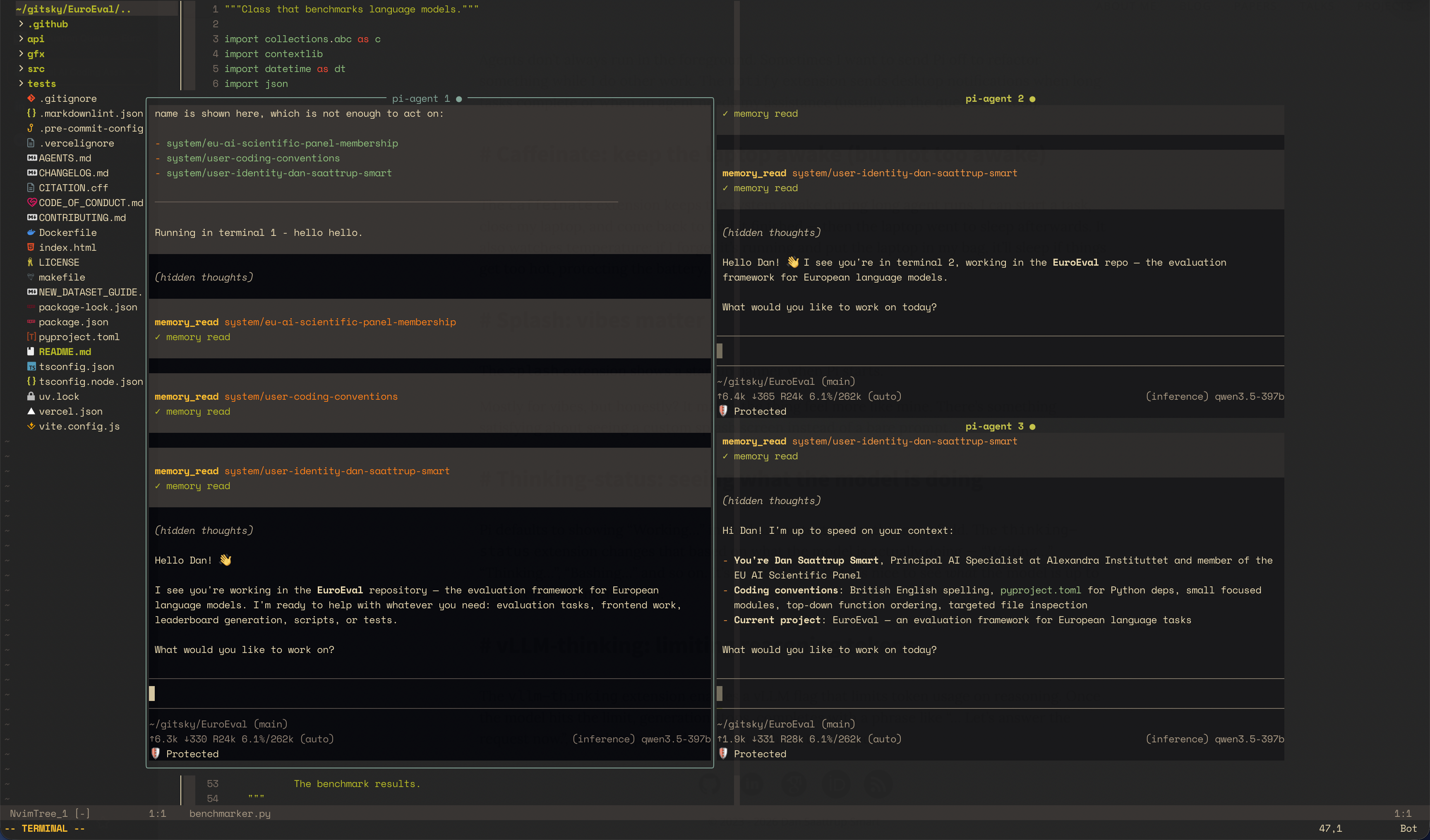
The plugin opens Pi in a centered floating window (80% × 80% by default), automatically cd’ing into the git root of the current buffer. I can toggle it in and out — sessions persist across toggles until I close their pane or exit Pi. Multiple sessions run in tiled floating panes: <C-s> splits the current pane, <C-x> closes it, <C-w> keys navigate between them. Inside the agent buffer, <C-c> aborts the current run (avoids leaving terminal mode), and <C-l> starts a fresh session. All of this is configurable: size, border, pane gap, keymaps.
# The results
These changes have led to significant improvements across the board. Token-efficient reading cuts context usage dramatically — I’m seeing 5-10x fewer tokens per session than my old setup. Git worktrees mean I can run four builders in parallel without merge conflicts. And the guardrails catch the local model quirks before they waste time.
The Neovim integration is probably the bit I use most. I can see everything happening at once, intervene when needed, and keep my whole workflow in one place. No more alt-tabbing between terminal windows.
You can find my full Pi configuration here, which includes the extensions and agent definitions.
# Closing thoughts
I switched to Pi because its extension model fit my local-model-optimised workflows better. Pi’s extensible architecture means I can add tools for local model quirks, optimise for token efficiency, and integrate with Neovim in ways that work for me. The result is something that adapts to how I work, not the other way around.
This is version 3 of my agentic setup. There will be a version 4. The field is moving fast, and I’m still finding new extensions to write, new agent patterns to encode, and new ways to make the orchestrator smarter.
But for now, it’s the best coding setup I’ve had. And it’s mine.
Have fun coding 😊